

This page is to help those people who are ignored
by services (chanop/nickop/noteop).
If you receive a message similar to this when you try to use services:
-NickOP- You are currently being
ignored by the AustNet services: common userid please visit http://www.austnet.org/support/faq/ignore.html
then you are ignored by services, and may find help
on this page.


Your ident is part of how the server sees you when you connect.
MrSomebody is guy23@vw8962.connect.net.au
* ask me
MrSomebody on #asd #newbies
MrSomebody using pacific.nsw.au.austnet.org Pacific Internet
MrSomebody End of /WHOIS list.
In this case, "guy23" is the ident. Many users just type
anything they think of for the ident. Some irc clients use the first
part of the "email address" you give in the setup, as
the ident. Some scripts when downloaded and installed on your computer
change your ident value. Your ident is meant to be unique on the
network. Some common idents are ignored because they are too common.
"me", "user", "enter", "hehe"
and "-" are some of these. You should change your ident
to a unique one, and keep it as that, to avoid being ignored by
services.

There are many flavours of IRC client. Your client documentation
should include information on how to change ident. The steps to
change in mIRC, pIRCh and Trillian are outlined below:
For
users of mIRC:
First choose a suitable ident (the one in this example is "iamsexc").
If you are online, type
/identd on [newident]
eg: /identd on iamsexc then
/emailaddr [newident] eg:
/emailaddr iamsexc
then
//server $server
this last step will disconnect you from the server and reconnect.
Your ident should be changed to your new ident.
Alternatively you can set your ident through your options (file
menu > options or <ALT>+O)
 Set
your "email address" to yourident@anything eg: imasexc@somewhere Set
your "email address" to yourident@anything eg: imasexc@somewhere
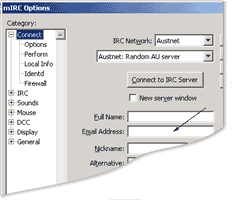
Click on "Identd" section on the left and enter your new
ident in the "User ID" space, then check Enable Identd
Server:
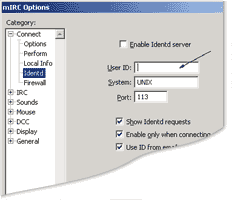
Click on OK and then connect as usual.
For
users of pIRCh:
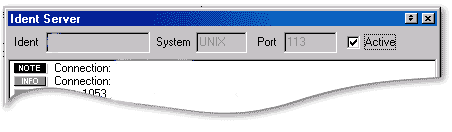
Go to Tools menu -> Ident server and in the ident box change
your Userid to your desired ident. Click on the "active"
box then reconnect to change your ident.
For
users of Trillian:
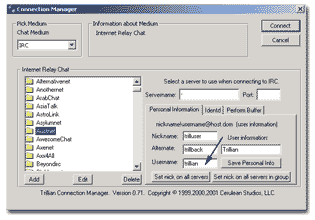
First go to the Connection Manager (Trillian is shown with the default
"XP" skin)
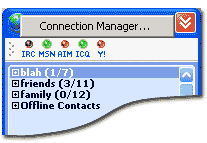
When the connection manager is open, Click on the Personal Information
tab and enter your chosen ident in the "Username " space:
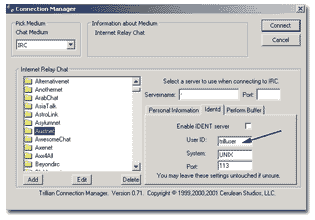
Then click on the "Identd" tab and enter your chosen ident
in the "User ID" space, and click on "enable IDENT
server" checkbox. Then connect as usual.

If you are still services ignored for reasons of a "common
userid" or "common ident" after these steps, please
visit either your IRC client help channel (eg #mirc) or ask in #help
or #asd for help.
|


